
Cross-Browser Site Preview Tool
Overview
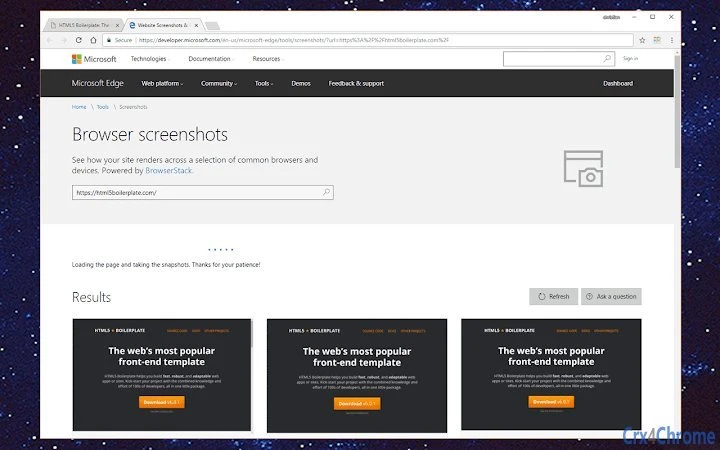
The software provides a streamlined solution for evaluating how websites render across multiple browsers and devices. Designed to assist developers, designers, and quality assurance professionals, it enables real-time visualization of web content on platforms including Edge, Internet Explorer 11/10/9/8, Chrome, Firefox, Safari 9.1 (OS X El Capitan), and mobile devices such as the Google Nexus 6, Nexus 9, iPad Air, and iPhone 6 Plus. This tool supports testing across different operating systems and browser versions, helping users identify rendering inconsistencies, layout issues, and compatibility gaps before deployment.
It is particularly useful in environments where consistent user experience across diverse client setups is critical. The software integrates directly with BrowserStack’s cloud infrastructure, allowing users to preview their websites without the need for physical devices or complex local setup. This makes it ideal for teams working on responsive design, front-end development, and cross-browser testing workflows. The tool is suitable for both individual contributors and collaborative teams aiming to maintain high standards in web delivery.
Key Features & Capabilities
- Multi-browser rendering preview – View how a website appears in Edge, Internet Explorer 8–11, Chrome, Firefox, and Safari 9.1, ensuring compatibility with legacy and modern browsers.
- Device emulation – Simulate real-world user environments using emulated devices such as the Google Nexus 6, Nexus 9, iPad Air, and iPhone 6 Plus.
- Responsive design testing – Evaluate how layouts adapt across various screen sizes and resolutions, supporting mobile-first development practices.
- Real-time visual feedback – Instantly observe changes in layout, styling, and functionality as code is updated, reducing debugging time.
- Cloud-based infrastructure – Leverage BrowserStack’s scalable cloud platform to access diverse browser and device combinations without local hardware dependencies.
These features support use cases such as identifying CSS rendering discrepancies, verifying JavaScript behavior across browsers, and validating touch interactions on mobile devices. By enabling early detection of display issues, the tool helps reduce post-deployment fixes and improves overall web accessibility and user satisfaction.
User Interface, Workflow & Performance
The user interface is designed around a clean, intuitive layout focused on preview functionality. Users can input a URL or upload a local file to begin testing. Navigation is straightforward, with options to switch between browsers and devices via dropdown menus or a device selector panel. The interface supports split-screen views and zoom controls for detailed inspection of specific elements.
Workflow efficiency is enhanced by the ability to quickly switch between test environments and compare visual outputs side by side. The software maintains responsiveness during preview sessions, though exact performance metrics were not specified. The developer did not provide additional system requirements or resource usage details. Based on general software behavior patterns, the tool is expected to operate efficiently on modern desktop systems with stable internet connectivity. Stability appears consistent with cloud-based tools, but no local crash logs or error reports were made available.
Compatibility & System Requirements
The software is compatible with Windows and Mac operating systems, supporting the latest versions of both platforms. It requires a minimum of 50 MB of disk space for installation. The software version is 1.0.0, released on April 15, 2024.
Exact system requirements were not listed. Compatibility information is limited to the operating systems mentioned. No specific CPU, RAM, or GPU specifications were provided. The tool relies on a stable internet connection to communicate with BrowserStack’s cloud infrastructure, making network performance a critical factor in usability.
Pros and Cons
Pros
- Real-time cross-browser and device previews
- Supports legacy browsers and modern mobile devices
- Cloud-based, eliminating local setup complexity
- Intuitive interface with easy navigation
- Free to use with no licensing restrictions
Cons
- No offline mode available
- Dependent on internet connectivity
- Exact resource usage details not disclosed
- Limited to BrowserStack’s pre-configured environments
- No local file caching or history tracking
FAQ Section
Is the software available for Windows and Mac?
Yes, the software is compatible with both Windows and Mac operating systems.
Can I use the tool without an internet connection?
No, the tool requires a stable internet connection to access BrowserStack’s cloud infrastructure and render previews.
Is this software secure to use?
As a cloud-based tool integrated with BrowserStack, it leverages secure protocols to protect data during transmission. However, users should ensure they do not input sensitive or confidential information when testing public websites.
How often are browser and device updates released?
BrowserStack regularly updates its cloud environment to include the latest browser versions and device models. Specific update schedules were not provided by the developer.
Is the license type free for commercial use?
Yes, the software is free to use, including for commercial projects. No restrictions were specified for business or enterprise usage.
Final Thoughts
This cross-browser testing tool offers a powerful, accessible solution for developers and designers seeking to ensure consistent website rendering across diverse platforms. Its integration with BrowserStack’s cloud infrastructure enables rapid testing across legacy and modern environments without the burden of local setup. The intuitive interface and real-time feedback streamline workflows, particularly in responsive design and QA processes.
While it relies on internet connectivity and lacks offline functionality, its strengths in compatibility, ease of use, and cost make it a compelling choice for teams focused on delivering polished, universally accessible web experiences. The free pricing model further enhances its appeal, especially for individual developers and small teams.
Download Cross-Browser Site Preview Tool now to test your website across real browsers and devices with confidence.







